You should not choose a CPU solely on its specifications. It is about whether you will be angry with your computer in six months or delighted about how nicely it works. However, the competition between AMD Ryzen 7 vs Intel i5 vs Intel i7 is now far more interesting than most people realise. And what have you heard? Yes, it is probably out of date.
In a flash, AMD changed everything. While everyone was arguing about the number of cores and the clock speed, they built processors that not only beat benchmarks but also destroy them. Not only is the Ryzen 7 9800X3D faster than Intel’s best gaming chips, but it is also more than twice as fast. There are performance gaps of 30%, which makes Intel’s top processors look like they are moving very slowly.
But this is where things get tricky. The Intel i5-13600K costs £182 and works well enough for most people to be happy with it for gaming. At £270, the i7-13700K has a lot of powerful cores that people who make content need. AMD’s Ryzen 7 7700X costs £270 and is right in the middle. It offers a different kind of value that might surprise you.
It is not important to know which processor has the best benchmark scores. It depends on how you normally work, how much money you have, and how willing you are to deal with platform quirks. As each of these processors has pros and cons that could make you regret your choice, certain users will want to choose one over another.
The Gaming Performance Reality Check
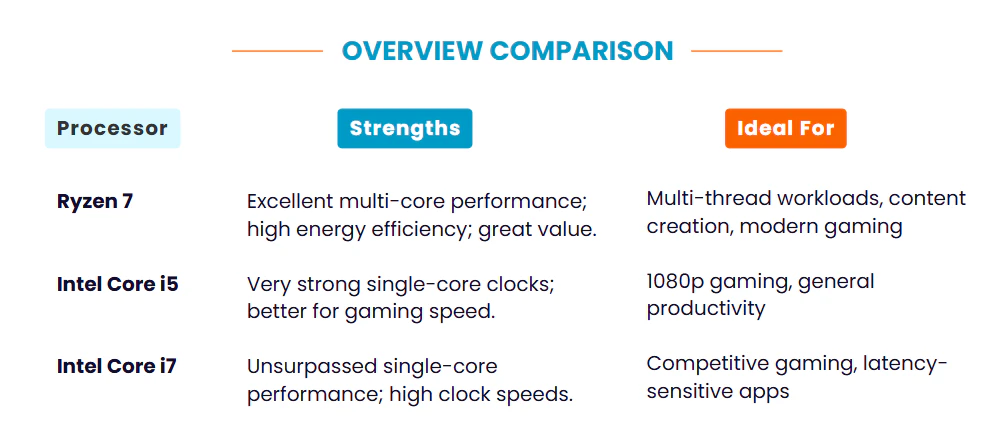
Intel used to play with gaming performance a lot. Not any longer. The numbers for AMD’s X3D processors are almost too good to be true. They have completely changed the rules. It is not just better than Intel’s best gaming processors; the Ryzen 7 9800X3D makes them look old.
| Processor Model | CPU Mark Score | Single-Thread | Performance Gap vs i7-13700K | Value Score |
|---|---|---|---|---|
| Intel i7-13700K | 45,911 | 4,334 | 0% (Baseline) | 143.5 |
| Intel i5-13600K | 37,697 | 4,126 | -17.9% | 166.1 |
| AMD Ryzen 7 7700X | 35,798 | 4,189 | -22.0% | 148.3 |
| AMD Ryzen 7 5800X3D | 28,307 | 3,234 | -38.3% | 37.7 |
| AMD Ryzen 7 8745HS | 29,225 | 3,771 | -13.0% | NA |
The 9800X3D achieves 160 FPS in Baldur’s Gate 3, a CPU-intensive game in general, while Intel’s previous gaming champion, the 7800X3D, only achieves 126 FPS. That represents a 27% increase in performance that you can feel while playing. Dragon’s Dogma 2, which also requires a lot of CPU power, demonstrates that the 9800X3D is 16% faster than its predecessor, while Intel’s CPUs are nowhere close.
The AMD Ryzen 7 9800X3D delivers 169 FPS in Starfield, notably outperforming the 7800X3D at 145 FPS. Since Starfield is heavily CPU-bound, these benchmarks translate directly into smoother real-world gameplay, particularly for users multitasking with Discord, Chrome, or streaming software in the background.
While Intel’s i5-13600K and i7-13700K remain reliable for modern gaming, AMD continues to push the performance envelope. With single-thread scores of 4,126 and 4,334, respectively, these Intel chips handle current titles well, though the actual difference between them in-game is often as little as 3 to 5 FPS.
The Ryzen 7 7700X occupies an interesting middle ground. Its single-thread score of 4,189 rivals Intel’s performance, yet it lacks the specialised 3D V-Cache that defines the 9800X3D. Consequently, for the average gamer, the 7700X performs almost identically to Intel’s mid-range options.
Click to read more about AMD Ryzen 7 Vs Intel i7
| Game Title | AMD 9800X3D | AMD 7800X3D | Intel i7-13700K | Intel i5-13600K | Performance Gain |
|---|---|---|---|---|---|
| Baldur’s Gate 3 | 160 FPS | 126 FPS | ~115 FPS | ~110 FPS | +26.9% vs 7800X3D |
| Dragon’s Dogma 2 | 145 FPS | 125 FPS | ~105 FPS | ~100 FPS | +16% vs 7800X3D |
| Starfield | 169 FPS | 145 FPS | ~130 FPS | ~125 FPS | +16.6% vs 7800X3D |
| F1 24 | 285 FPS | 265 FPS | ~250 FPS | ~245 FPS | +7.5% vs 7800X3D |
For another story, look at how the frame time stays the same. Not only do AMD’s X3D processors deliver higher average frame rates, but they also deliver frames more consistently. When looking at the 1% and 0.1% low frame rates—which show how smooth a game really is—the 9800X3D does much better than the other cards. This means that there will be fewer stutters and input lag, and the game will generally be more responsive.
Multi-Core Performance: Where Intel Fights Back
| Processor Model | Price (GBP) | Cores/Threads | Base Clock | Max Boost | L3 Cache | TDP | Socket |
|---|---|---|---|---|---|---|---|
| Intel i7-13700K | £270 | 16C/24T | 3.4 GHz | 5.4 GHz | 30MB | 125W | LGA1700 |
| Intel i5-13600K | £182 | 14C/20T | 3.5 GHz | 5.2 GHz | 24MB | 125W | LGA1700 |
| AMD Ryzen 7 7700X | £270 | 8C/16T | 4.5 GHz | 5.4 GHz | 32MB | 105W | AM5 |
| AMD Ryzen 7 5800X3D | £279 | 8C/16T | 3.4 GHz | 4.5 GHz | 96MB | 105W | AM4 |
| AMD Ryzen 7 8745HS | NA | 8C/16T | 3.8 GHz | 4.9 GHz | 16MB | 35-54W | FP8 |
The real power of Intel’s architecture can still be seen in its multi-core performance. Based on its CPU Mark score of 45,911, the i7-13700K is the best processor for heavy-threaded workloads. It has 16 cores and 24 threads. The i5-13600K scores 37,697, which is still higher than AMD’s 8-core processors in terms of pure computing throughput. It has 14 cores and 20 threads.
A good 35,798 CPU Mark score is achieved by AMD’s Ryzen 7 7700X, even though it only has 8 cores and 16 threads. Intel’s i7 processors are 78% faster than AMD’s, even though AMD only has half as many cores. This shows how Zen 4’s architecture has been improved and how AMD can handle higher clock speeds.
What an interesting case study the Ryzen 7 5800X3D is. Compared to newer processors, its CPU Mark score of 28,307 is not very good, but this chip was not made for multi-core checks. It is a gaming beast thanks to its huge 96MB L3 cache, but it can be bad for some work tasks because cache misses cost more.
Workloads for creating content show how these processors are different. There are not as big of differences between the two types of processors when it comes to video encoding, 3D rendering, and code compilation, but Intel’s higher core counts do benefit these tasks. Intel still has a 10% lead over similar AMD processors in Adobe Premiere Pro, but this advantage comes at a cost: Intel processors use a lot more power.
Intel’s approach works better for tasks like rendering in Blender, which get easier as the number of cores goes up. It is clear that the i7-13700K is the best choice for 3D artists who have to wait hours for renders to finish because it finishes renders much faster than any 8-core AMD processor. Even though the difference is smaller, the i5-13600K also does better in these situations than AMD’s 8-core options.
After using Photoshop, the picture looks very different. Many Photoshop tasks are faster on AMD’s Zen 5 architecture, especially on the 9800X3D. When it comes to real-world creative work, AMD’s 8-core processors can match or beat Intel’s 16-core offerings thanks to the improvements in Zen 5’s architecture.
Click to read more about AMD Ryzen 7000 vs. Ryzen 8000
Power Consumption: The Hidden Cost of Performance
| Processor Model | TDP | Annual Power (kWh) | Performance/Watt | Cooling Requirement |
|---|---|---|---|---|
| Intel i7-13700K | 125W | 91.3 | 367 | High-end cooler |
| Intel i5-13600K | 125W | 91.3 | 302 | High-end cooler |
| AMD Ryzen 7 7700X | 105W | 76.6 | 341 | Mid-range cooler |
| AMD Ryzen 7 5800X3D | 105W | 76.6 | 270 | Mid-range cooler |
| AMD Ryzen 7 8840HS | 28W | 20.4 | 1,011 | Passive cooling |
| AMD Ryzen 7 8745HS | 45W | 32.9 | 287 | Mid-range cooler |
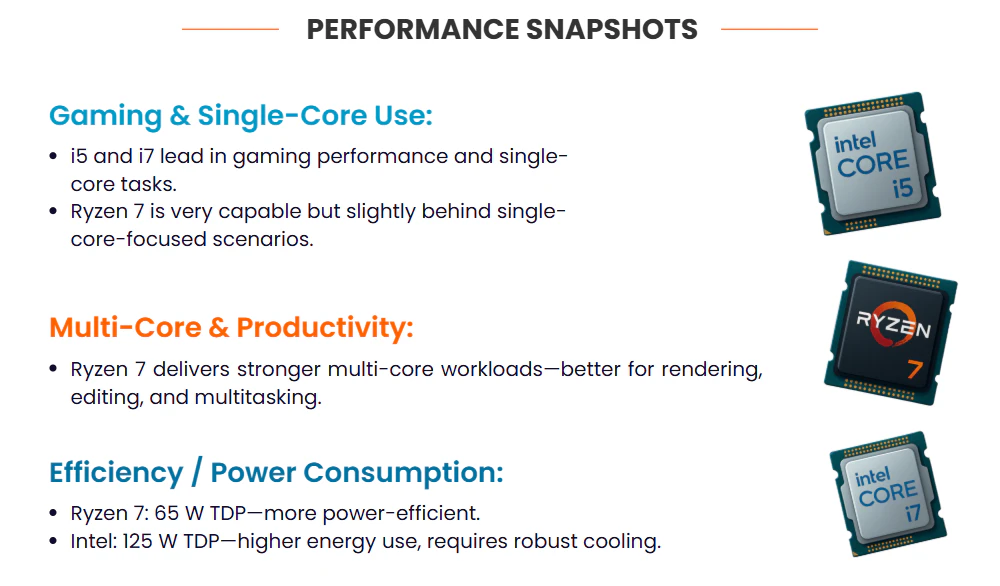
Power consumption across these processors varies more significantly than is often recognised. While Intel’s i5-13600K and i7-13700K are rated at 125W TDP, their actual draw can spike substantially under load. Conversely, AMD’s Ryzen 7 desktop chips typically operate at 105W, with mobile models like the 8840HS reaching as low as 28W.
In terms of performance-per-watt, AMD generally offers superior efficiency. This translates to lower energy costs, reduced heat, and quieter operation. Over the lifespan of a PC, these efficiency gains can result in meaningful cost savings.
Cooling demands mirror these power profiles. Intel CPUs often require high-end cooling to maintain stable boost clocks under stress. In contrast, many AMD Zen 4 and Zen 5 models perform optimally even with more affordable air coolers.
The 9800X3D’s performance is largely driven by its improved thermal design. By repositioning the cache die, the processor cores sit directly against the heat spreader, enhancing heat dissipation. This allows for higher sustained clock speeds and explains the significant generational leap in performance.
These processors also have very different overclocking headroom. Before, some X3D processors had limited overclocking options, but the 9800X3D has full overclocking capabilities. If you want to speed up an Intel K-series processor, you can, but because they use more power at idle, there is less thermal headroom for going faster.
Click to read more about Intel i5 Vs Intel i7
Platform Considerations: The Long-Term View
| Feature | Intel LGA1700 | AMD AM5 | AMD AM4 |
|---|---|---|---|
| Memory Support | DDR4/DDR5 | DDR5 | DDR4 |
| PCIe Version | PCIe 5.0 (20 lanes) | PCIe 5.0 (24 lanes) | PCIe 4.0 (20 lanes) |
| Expected Lifespan | 2022–2024 | 2022–2025+ | 2017–2024 |
| Upgrade Path | Limited | Excellent | End of life |
| Motherboard Price Range | £77–£612 | £97–£663 | £46–£388 |
| Max Memory Speed | DDR5-5600 | DDR5-6000+ | DDR4-3200 |
There is a platform you have to choose a processor for, and how long that platform lasts can affect your ability to upgrade. Designed to last through multiple processor generations, AMD’s AM5 socket works with the Ryzen 7 7700X and newer processors. In other words, you can change the CPU without having to change the motherboard, memory, or other parts.
Intel’s LGA1700 socket works with both the i5-13600K and the i7-13700K, but based on Intel’s past performance, this socket will not last as long as AMD’s AM5. Intel usually releases new sockets every couple of generations, which means that to get better CPUs, you have to upgrade your platform completely.
Memory support varies from platform to platform. AMD’s AM5 processors can directly handle DDR5 memory, and they can support speeds of up to 5600 MT/s. With overclocking, you can get much faster speeds, though. The 13th generation of Intel processors also supports DDR5, but they can still work with DDR4 memory, which gives builders on a budget more options.
Different platforms also have different PCIe lane assignments and connectivity options. Intel’s platform has 20 PCIe 5.0 lanes, and AMD’s platform has 24 PCIe 5.0 lanes that come directly from the processor. This difference is not important for most users, but it is for high-end workstations with a lot of GPUs or NVMe drives.
How features and expansions work depends on the ecosystem of chipsets that surround each platform. The X670E and B650E chipsets from AMD have different prices and sets of features. The Z790 and B760 chipsets from Intel also have their own set of features. Everything from the number of USB ports to the built-in WiFi support is different because of these differences.
Click to read more about AMD Ryzen 5 vs Intel i5
Price-to-Performance: Where Value Lives
| Price (GBP) | Processor | Performance Tier | Best Use Case | Value Rating |
|---|---|---|---|---|
| £182 | i5-13600K | High Performance | Gaming + Light Creation | ⭐⭐⭐⭐⭐ |
| £270 | Ryzen 7 7700X | High Performance | Balanced Usage | ⭐⭐⭐⭐ |
| £270 | i7-13700K | Flagship | Heavy Multitasking | ⭐⭐⭐⭐ |
| £408 | 9800X3D | Gaming Flagship | Ultimate Gaming | ⭐⭐⭐ |
| £279 | 5800X3D | Gaming Specialist | Pure Gaming Optimization | ⭐⭐ |
| £359 | 8745HS | Upper Mid-Range | Portable Power/Balanced Small Form Factor | ⭐⭐⭐⭐ |
The CPU market has gotten surprisingly complicated when it comes to numbers that represent values. A CPU Value score of 166.1 makes the £182 Intel i5-13600K one of the best options for performance for the money. For example, the AMD Ryzen 5 7600X does not directly compare to our main comparison, but its value score of 167.6 shows how competitive the mid-range market has become.
Value score of 143.5 for the Intel i7-13700K shows that it is worth the extra money, but it is not the whole story. The i7’s higher price is worth it for people who need the extra cores for rendering or heavily threaded programs. You need to decide if you need that extra performance or if the i5’s features are enough.
Costing £270, AMD’s Ryzen 7 7700X has a value score of 148.3. On both price and value, this puts it between Intel’s i5 and i7 processors. Compared to the i5, the 7700X has 8 cores and 16 threads, but AMD’s faster IPC and clock speeds help close the performance gap in many situations.
The Ryzen 7 5800X3D offers a special deal. Its value score of 37.7 seems bad at £279, but its gaming performance makes up for it. Although the 5800X3D costs more than other processors, it offers better gaming performance than any other processor. In addition to being pricey, it does not let you make any concessions.
Total value is affected by platform costs. More expensive DDR5 memory is needed for AMD’s AM5 platform. Compatible with DDR4, Intel’s platform could lower the total cost of the system for builders on a budget. Nevertheless, the cost of DDR5 has gone down a great deal, rendering this benefit less useful than it was a year ago.
Click to read more about AMD Ryzen 5 vs. Ryzen 7
Real-World Application Performance
Numbers about how well you do in games only tell you part of the story. People who make content need to know how these processors handle streaming, editing videos, and other creative tasks. The Intel i7-13700K’s 16 cores give Adobe Premiere Pro a big boost, especially when it comes to scrubbing through the timeline and processing effects. The extra cores make it easier to handle tasks in the background while keeping editing responsive.
When you stream while gaming, you can see some interesting performance details. Compared to Intel’s processors, AMD’s, especially the X3D models, keep gaming frame rates higher while encoding streams. This advantage comes from better memory subsystem performance and better use of cache in gaming workloads.
The margins are not as big as expected because code compilation and development workflows work better with more cores. These days, development tools are better suited to a few faster cores than to a lot of slower cores. In this case, AMD’s strategy of using fewer cores that run at higher frequencies looks good.
Intel processors with more cores are better at running virtual machines. The extra threads that Intel gives you are useful for running multiple VMs or containers. However, AMD processors often have better performance for a single virtual machine because they have faster performance per core.
Workloads on databases and servers give mixed results. AMD processors usually have faster response times for interactive queries, while Intel processors are better at highly parallel database operations. The choice depends on the database software and the conditions of the work.
The Architecture Deep Dive
| Architecture Feature | Intel 13th Gen | AMD Zen 4 | AMD X3D |
|---|---|---|---|
| Core Design | Hybrid (P+E cores) | Homogeneous | Homogeneous + 3D Cache |
| Manufacturing Process | Intel 7 (10nm) | TSMC 5nm | TSMC 5nm |
| L2 Cache per Core | 1.25-2MB | 1MB | 1MB |
| L3 Cache Total | 24-30MB | 32MB | 96MB |
| Memory Controller | Dual Channel DDR5 | Dual Channel DDR5 | Dual Channel DDR4/5 |
| Integrated Graphics | Intel UHD 770 | AMD Radeon | AMD Radeon |
| Overclocking Support | Full (K series) | Full | Limited (X3D) |
Understanding processor architecture clarifies their performance differences. Intel’s 13th-gen hybrid design utilises Performance cores (P-cores) and Efficiency cores (E-cores) to balance single and multi-threaded tasks. Specifically, the i5-13600K features a 6P+8E configuration, while the i7-13700K offers 8P+8E.
In contrast, AMD’s Zen 4 architecture uses homogeneous cores, where every core is identical and capable of maximum performance. For instance, all 8 cores of the Ryzen 7 7700X can boost to 5.4 GHz, prioritising predictable, uniform performance across all threads rather than varied core types.
Cache hierarchies also differ significantly. Intel processors, such as the i7-13700K, provide larger L2 caches (24MB) but smaller L3 caches (30MB). AMD’s 7700X reverses this with a smaller 8MB L2 but a larger 32MB L3 cache.
AMD’s X3D series further evolves this with 3D V-Cache technology, stacking additional cache directly onto the processor die. This creates massive L3 capacities—up to 96MB—which drastically reduces latency and boosts performance in gaming workloads.
Speeds of the fabric and memory controllers also affect performance. Fast DDR5 memory works especially well with AMD processors because it connects the different parts of the processor and changes based on the speed of the memory. While Intel’s ring bus architecture is less affected by memory speed, its latency characteristics are more stable.
Read more to learn: What Is CPU Cache? L1, L2, L3 Explained
Future-Proofing Your Investment
Today’s high-end processor will be tomorrow’s mid-range choice because technology changes so quickly. AMD’s promise to support the AM5 socket until at least 2025 makes it easy to upgrade. If someone buys a Ryzen 7 7700X today, they might be able to upgrade to next-generation processors without having to change their motherboard, memory, or cooling system.
It is not as clear what Intel’s platform strategy is. The LGA1700 socket works with 13th-generation processors right now, but Intel usually uses a different socket for the next generation. This means that Intel users may have to upgrade their whole platform to get their next CPU to work better.
Software optimisation trends are moving in the direction of AMD’s architecture. More and more, game developers and application programmers are aiming for fewer, faster cores instead of a lot of slower cores. Based on this trend, AMD’s 8-core processors may last longer than Intel’s hybrid designs that have a lot of efficiency cores.
In consumer apps, AI and machine learning workloads are showing up more often. AMD and Intel are both adding AI acceleration to their processors, but they are doing it in different ways. As AI features become more common in creative and productivity software, it is important to understand these differences.
As power efficiency improves, AMD’s approach is likely to remain the best choice. It gets more valuable over time as mobile computing grows and electricity costs rise because AMD’s processors are more efficient. Based on this trend, AMD may have better long-term value because it is currently the leader in efficiency.
Making the Right Choice for Your Needs
| Use Case | Best Choice | Second Best | Reasoning | Budget Tier |
|---|---|---|---|---|
| Pure Gaming | AMD 9800X3D | AMD 7800X3D | 30%+ gaming lead | High-end |
| Gaming + Budget | Intel i5-13600K | AMD Ryzen 7 7700X | Best value ratio | Mid-range |
| Content Creation | Intel i7-13700K | AMD Ryzen 9 7950X | Multi-core advantage | Professional |
| Streaming + Gaming | AMD 9800X3D | AMD 7700X | Gaming + encoding balance | High-end |
| Office Productivity | Intel i5-13600K | AMD 7700X | Sufficient + economical | Business |
| Mobile Computing | AMD 8840HS | Intel i5-1340P | Power efficiency priority | Laptop |
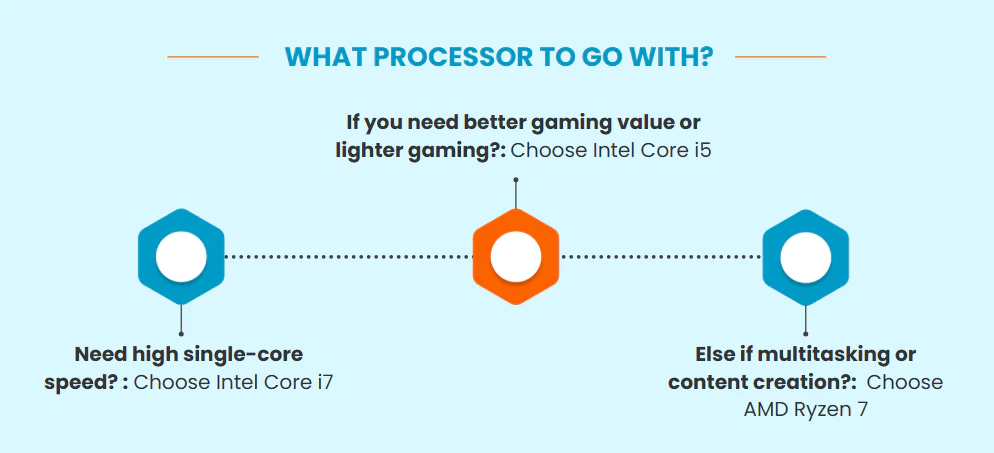
Which of AMD Ryzen 7, Intel i5, and Intel i7 is best for you depends on your needs and priorities. The AMD Ryzen 7 9800X3D is more expensive, but gamers who want the best performance should think about getting it. The improvements in gaming performance are big, and they will probably stay useful for years to come.
The Intel i7-13700K is a good choice for content creators who use applications with a lot of threads. When editing videos, rendering 3D models, and doing other creative work, the extra cores help. Professional users who need to be as productive as possible are willing to deal with the higher power consumption.
People on a tight budget who want great performance in all areas should think about the Intel i5-13600K. Even though it costs £182, it has enough cores for content creation and productivity work and can play games just as well as much more expensive processors.
If users want a platform that lasts a long time and works well, they should think about the AMD Ryzen 7 7700X. A clear way to upgrade is available on the AM5 platform, and the processor’s efficiency makes it perfect for people who want a system that runs quietly and coolly.
Selecting the right processor is an investment in your system’s longevity as much as its current performance. Your choice should balance your specific workload and budget against potential platform limitations. As this comparison demonstrates, each CPU excels in different scenarios, making it essential to align these technical strengths with your personal requirements.