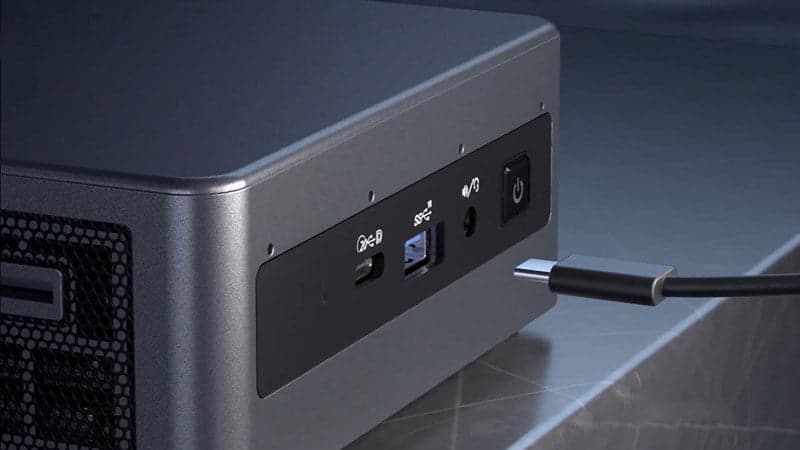
Premium notebooks, desktop PCs, and some portable computers are increasingly adopting connectivity standards like Thunderbolt 4 and USB4. Each one features a USB Type-C connector, which can achieve transfer rates of up to 40 Gbps and allows for simultaneous video and power transmission. The connector type, USB Type-C, serves as the physical interface that enables support for both USB4 and Thunderbolt 4 standards.
There is a great overlap between the technologies, making differentiation challenging. USB4 and Thunderbolt 4 represent the latest versions of their respective standards, offering the most recent advancements in speed and compatibility. It’s not as simple as learning to tell the USB-C cables from the USB-A ones, so this article will discuss everything you need to know about USB4 and Thunderbolt 4.
Introduction to USB Standards
The Universal Serial Bus (USB) standard has come a long way since its introduction, evolving to meet the growing demands of modern devices and users. Each new version has brought improvements in speed, compatibility, and functionality, making it easier to connect and power a wide range of devices. The USB Implementers Forum (USB-IF), the organisation responsible for developing and maintaining USB standards, has ensured that new versions like USB4 and Thunderbolt 4 offer backward compatibility with older devices, so users can continue to use their existing peripherals without issue.
Click and Read More about Types of USB Ports and Their Current Uses
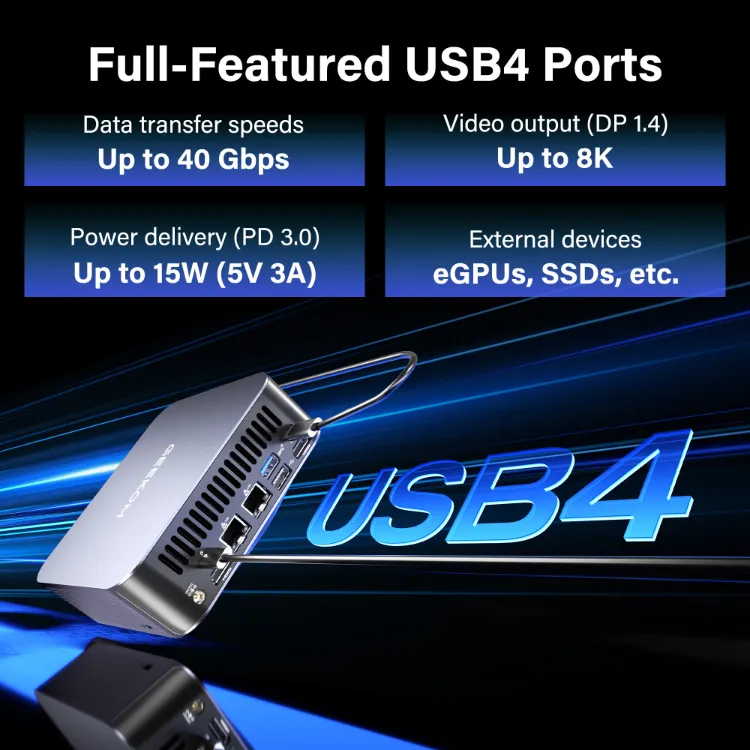
With USB4 and Thunderbolt 4, users benefit from high-speed data transfer, advanced video output capabilities, and robust power delivery—all through a single, versatile connection. Understanding how these standards have evolved helps highlight the key differences and advantages of USB4 and Thunderbolt 4 for today’s data-driven world.
What is Thunderbolt 4?
Thunderbolt 4 was unveiled by Intel at CES 2020, and the complete specification was made public in July of that same year. Fast data transfers, device charging, and video output to external monitors are all possible with only one Thunderbolt 4 cable connection. Thunderbolt 4 is four times as fast as USB 3.2 Gen 1 and offers a maximum simultaneous bandwidth of 40Gbps. A maximum of five Thunderbolt devices can be connected to a single PC. Thunderbolt 4 offers guaranteed performance due to strict certification requirements, and is recognised by the Thunderbolt logo (lightning bolt symbol) on ports and cables.
With a USB-C connection, Thunderbolt 4 works with previous Thunderbolt versions and is forward-compatible with PCIe, DisplayPort, and USB4. Thunderbolt 4 offers higher transfer rates and superior performance with a minimum PCIe requirement of 32Gbps. Thunderbolt 4 devices must pass Intel certification tests, ensuring reliability and performance. Thunderbolt 4 supports daisy chaining of devices, allowing users to connect multiple monitors and high-performance peripherals such as external GPUs and storage drives through a single port, which is especially valuable for creative professionals and professional workflows.
Thunderbolt 4 also provides high-speed connectivity and better compatibility with a wide range of devices and peripherals, making it ideal for demanding users. It is designed for users who require maximum performance and reliability, and is better suited for professionals who need stable, high-speed performance. Thunderbolt 4 devices tend to be more expensive due to mandatory certification, stricter hardware requirements, and licensing, but this price premium ensures strict minimums for data transfer, power, and video across all ports and cables.
Key features include:
- Support for daisy chaining multiple devices, including multiple monitors and high-performance peripherals like external GPUs and SSDs.
- Mandatory support for sleep mode, allowing Thunderbolt 4 docks to wake a laptop from sleep, which is a required security feature.
- Mandatory Intel VT-d-based DMA protection for enhanced security.
- Guaranteed performance and reliability through Intel certification.
- High-speed connectivity and better compatibility for professional and creative workflows.
- Thunderbolt logo (lightning bolt symbol) on certified ports and cables, indicating Thunderbolt 4 capabilities.
Features of Thunderbolt 4
- A maximum cable length of 2 meters (6.5 feet) allows for 40Gb/s data transfer speed.
- With 32 Gb/s PCIe, you may transfer data quickly and efficiently. This is twice more as that of Thunderbolt 3
- Can support dual 4K monitor or one 8k display
- One 100W laptop charging port is required.
- Has a wake-from-sleep support feature
What is USB4?
USB, or Universal Serial Bus, has been available since 1996 and is an industry standard for connecting devices to personal computers. USB4 was introduced in 2019 by the USB Implementers Forum and is a flexible, open standard. With its foundation in the Thunderbolt standard, USB4 can reach transfer rates of up to 40Gbps, though actual speeds may vary depending on the device and cable length. It has a USB-C connector, so you’ll need an adaptor to use it with a USB 4 cable, but it’s backwards compatible with USB 3.2 or even USB 2.0. USB4 is generally cheaper and more cost-effective due to the absence of mandatory certification requirements, making it a practical choice for cost-conscious users and everyday tasks. In addition to being compatible with DisplayPort 2.0, USB4 can also output video in 8K and 16K resolutions at 60 frames per second. USB4 is available on many devices, including laptops and docking stations, and supports connecting different ports for video output, data transfer, and charging.
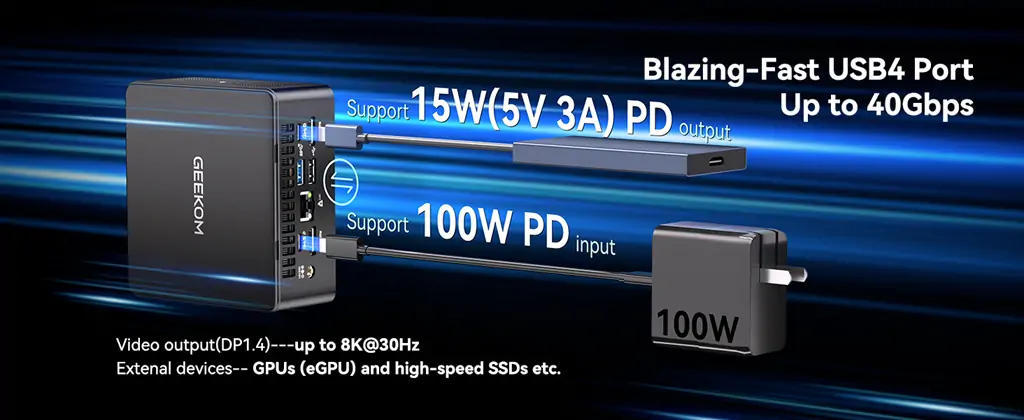
USB4 supports connecting external SSDs and external drives for fast file transfers, and can handle multiple tasks simultaneously, such as transferring data while charging a device. It can offer speeds up to 40Gbps, but performance may vary depending on the device and implementation. USB4 and Thunderbolt 4 share the same underlying protocol, but Thunderbolt 4 guarantees stricter standards and certification. Users should check product specifications to confirm support for high-resolution displays and other advanced features. USB4 supports up to 100W charging power via USB-C connectors, making it suitable for powering laptops and other devices. PCIe tunnelling is supported in USB4 for compatibility with external drives and docking stations. USB4 works with most USB devices, including USB 3.x, and USB4 devices are fully compatible with Thunderbolt 4 ports. USB4 supports connecting 4K monitors at 144 Hz, which is beneficial for gamers and content creators.
However, it does not allow dual displays like Thunderbolt 4. Due to the one-way nature of DisplayPort 2.0’s data transmission can support up to 80 Gbps bandwidths. Thanks to its high transfer rates, you can connect. Thanks to its high transfer rates, even a dedicated graphics processing unit or the GPUderbolt 3 can offer 100W power. USB4 can carry data up to 40Gbps, while some devices only support up to 20Gbps.
Features of USB4
- Only USB4 uses Type C, simply known as USB-C or Type C.
- USB4 supports power levels that can reach 100 W.
- USB4 can transfer data at speeds of up to 40 Gbps.
- Thunderbolt 3 serves as the foundation for USB4.
USB-C Connector and Cable
The USB-C connector, also known as USB Type-C, has quickly become the universal standard for connecting everything from laptops and smartphones to tablets and docking stations. Its small, reversible design makes it easy to plug in, and it supports a wide range of protocols—including USB4, Thunderbolt 4, and DisplayPort—over the same USB-C connector. This means you can use a single USB-C cable for high-speed data transfer, video output, and power delivery, simplifying your setup and reducing cable clutter. However, not all USB-C cables are created equal. To get the most out of your devices, it’s important to check the technical specifications, such as maximum bandwidth and supported features, to ensure compatibility with USB4 and Thunderbolt 4. By using the same USB-C connector for both standards, manufacturers make it easier for users to connect devices, but always confirm your cable and port support the features you need for optimal performance.
Power Delivery and Charging
One of the standout features of USB-C is its support for Power Delivery (PD), which allows for fast charging and high-power output through a single cable. Both USB4 and Thunderbolt 4 support up to 100W of power delivery, making it possible to quickly charge laptops, tablets, and other devices while transferring data or video. This is a game-changer for both everyday users and power users, as it means you can rely on one cable to handle multiple tasks—charging your device, transferring files, and connecting to displays—all at once. However, it’s important to remember that not every USB-C port or cable supports the same level of power delivery. Always check your device’s specifications to ensure you’re getting the fast charging and power delivery capabilities you expect from USB4 and Thunderbolt 4.
Docking Station and Steam Deck Compatibility
Docking stations have become essential for users who want to expand their laptop or gaming console’s connectivity with minimal hassle. Thanks to USB4 and Thunderbolt 4, modern docking stations can deliver high-speed data transfer, robust power delivery, and advanced video output—all through a single cable. For example, the Steam Deck, a popular handheld gaming device, can take advantage of a USB4 mobile docking station like the beCreatus GR10 to enable smooth 120Hz gaming and support for 4K 120Hz or 8K 60Hz video output via HDMI 2.1. When choosing a docking station, it’s important to consider the number of ports, power delivery capabilities, and video output options to ensure it meets your needs and is fully compatible with your devices. Whether you’re connecting a laptop, gaming console, or other devices, USB4 and Thunderbolt 4 docking stations offer the flexibility and performance required for today’s demanding workflows.
Comparison with USB 3.2
While USB 3.2 remains a reliable option for many users, it can’t match the performance and versatility of USB4 and Thunderbolt 4. The key differences are clear: USB4 and Thunderbolt 4 offer much higher maximum speed for data transfer, support for higher resolution display output, and greater power delivery—making them ideal for tasks like video editing, gaming, and transferring large files. USB 3.2 is still suitable for everyday use, but if you need better performance, future-proof compatibility, and support for the latest devices, USB4 and Thunderbolt 4 are the way to go. When deciding between these standards, consider your specific needs, the types of devices you use, and the cost and availability of compatible cables and accessories. For users who demand the best in speed, display output, and power delivery, USB4 and Thunderbolt 4 provide a clear advantage over older USB versions.
USB4 vs Thunderbolt 4: The Key Differences
💡 Key Takeaway: Thunderbolt 4 guarantees premium performance across all devices, whilst USB4 offers greater flexibility with variable specifications.
Thunderbolt 4, as well as USB 4, looks and feels identical. They are similar because they both have a USB-C connector, can transfer data at up to 40Gbps, pass through video, and charge and power connected devices. Thunderbolt 4 and USB4 may sound similar, but they are not the same despite their appearances. The differences come in the minimum requirements. USB 4.0 supports devices with connectivity speeds of up to 20Gbps.
Thunderbolt 4 offers guaranteed performance, with strict minimums for speed, power delivery, and video support, making it highly reliable for professional and high-performance peripherals. In contrast, USB4’s capabilities can vary depending on the device, model, or manufacturer’s implementation, so performance and features are not always consistent. USB4 is a flexible, open standard, while Thunderbolt 4 is a stricter, certified standard that guarantees all of USB4’s top features.
In contrast, the bare minimum speed for a Thunderbolt 4 device is 32 Gbps. UBS 4 requires a minimum of 7.5W, while Thunderbolt 4 necessitates a minimum speed of 15W. When looking to purchase a device, you must take into account the minimal power and speed needs. USB4 allows for speeds of up to 40Gbps. Therefore, manufacturers can select between 20Gbps and 40Gbps. Thunderbolt 4 guarantees a minimum speed of 32Gbps and 15W in all circumstances. Over 2 meters, Thunderbolt 4 connections can carry data at 40Gbps.
In comparison, UBS4’s capacity for 40Gbps is limited to distances of one meter or less and drops to 20Gbps for connections two meters or longer. Thunderbolt 4 and USB4 cables have distinctive branding that makes them easy to recognise apart. Unlike the familiar USB logo, which appears in either a 20 or 40 in USB 4 cables, a lightning logo with the 4 denotes Thunderbolt 4 connections.
USB4 vs Thunderbolt 4: Which One is Better?
Whilst the same hardware supports both standards, Thunderbolt 4 has stricter criteria for its minimum configuration.
The Verdict
The choice between Thunderbolt 4 and USB4 ultimately comes down to personal requirements. Despite Thunderbolt 4’s superiority in specifications, USB4 represents a significant advancement and shares many similarities with its premium counterpart—making it an excellent choice for cost-conscious users.

- Powerful computing power: Intel Core Ultra 9 processor with built-in Intel AI Boost 1.4 GHz NPU, supports 500+ AI models in 20+ categories
- Rich interfaces: 8 USB ports(including 2 × USB4 Ports), SD card reader, and Kensington Lock, worry-free expansion
- High-speed connection: Dual 2.5G Ethernet ports, Intel® Bluetooth® 5.4 and Wi-Fi 7
- High-speed storage: Equipped with blazing-fast 32GB of DDR5 memory (upgradeable to 128 GB) and support for up to 6 TB of storage.
- Dual USB4 Ports (Rival OCuLink): Unlock next-generation connectivity. Dual USB4 ports offer Thunderbolt-speed data transfer (40Gbps), dual 8K display output, and support for external graphics cards, effectively replacing OCuLink ports.
If you were to choose between Thunderbolt 4 and any other connection type, you would be making the right decision. With this in mind, if you’ve already chosen the cable you prefer and need more slots, then go ahead and get the GEEKOM GT2 Mega Mini PC. This device lets you use two USB4 ports. This is a reasonably solid setup that covers all your basic needs out of the box, in addition to having five USB 3.2 Type-A ports, one USB 2.0 Type-A port, two HDMI ports, and two 2.5G LAN RJ45 ports for a fast and steady network.