A single GEEKOM A9 Mega with the AMD Ryzen AI Max+ 395 and 128 GB of memory ran the 111.4 GB Qwen3.8-Flash-Next UD-Q4_K_XL model on its own, with no second machine and no cascade. In our llama.cpp tests, it generated 32.43 tokens/s with a short 128-token prompt and still held 15.45 tokens/s with a 128K-token prompt.
The trade-off sits in the wait before the first word. At 128K input tokens, time to first token (TTFT) reached 720.61 seconds, about 12 minutes. Decode speed stays usable as context grows; prompt processing is where long inputs cost you time.
- 32.43 tokens/s generation at 128 input tokens
- 15.45 tokens/s generation at 128K input tokens
- 111.4 GB 4-bit model on one 128 GB mini PC
Every number on this page comes from a published test record, with the launch command, model files and software build. You can check the raw records in our GitHub benchmark repository or the dataset on Hugging Face.
Full benchmark results: 128 to 128K tokens
We measured the model at six input lengths, from a 128-token prompt up to 128K tokens. Decode speed falls from 32.43 to 15.45 tokens/s across that range, roughly halving, while time to first token grows by several hundred times.
Decode rate by context length
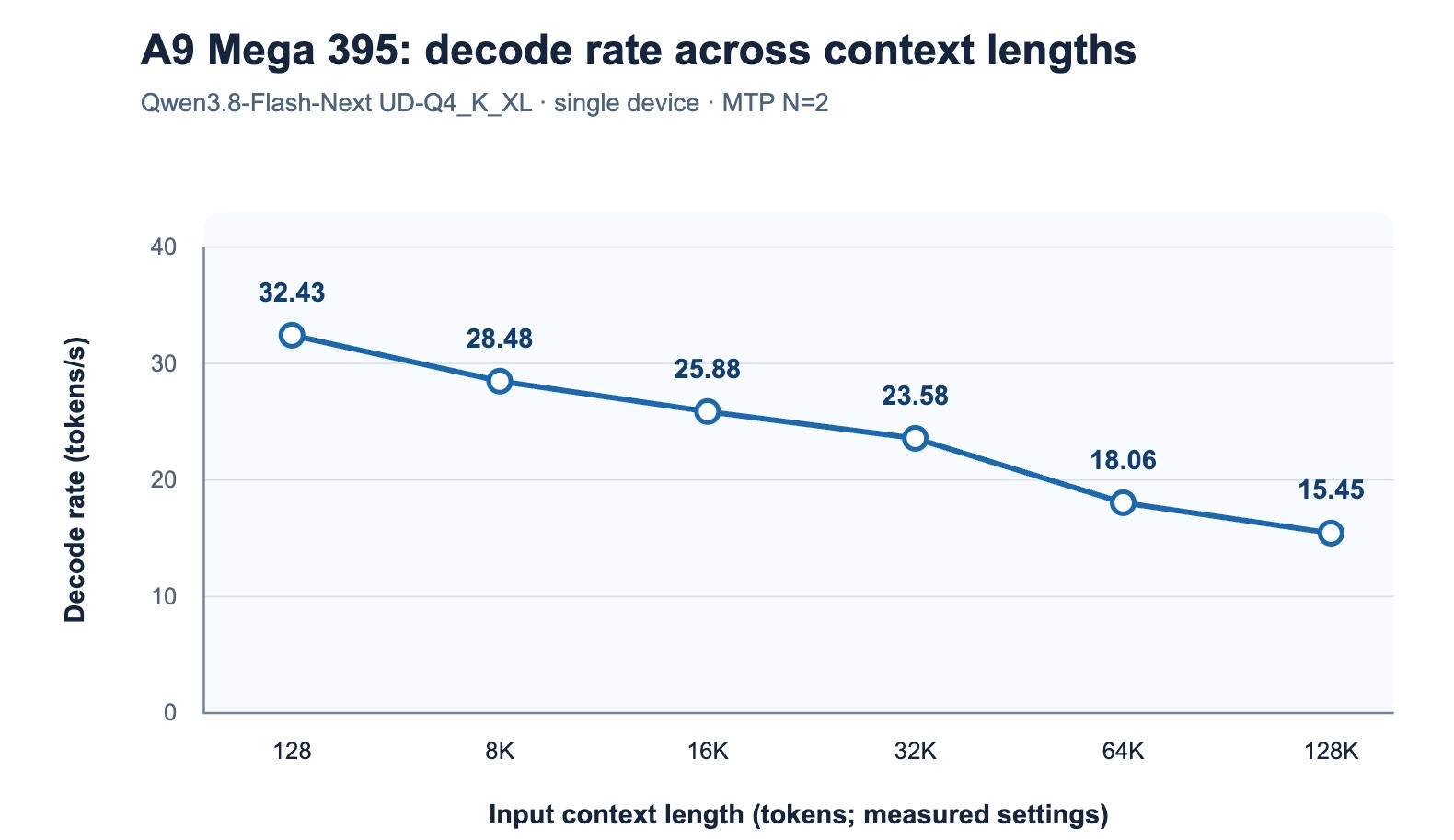
The points on the chart are spaced evenly by test setting for readability. Their horizontal distance is not proportional to token count.
Full data table
| Input length (tokens) |
Output length (tokens) |
TTFT (s) |
Prefill (tokens/s) |
Decode (tokens/s) |
End-to-end (s) |
Memory (GB) |
|---|---|---|---|---|---|---|
| 128 | 5,000 | 0.97 | 132.22 | 32.43 | 155.15 | 101.61 (+30.17) |
| 8K | 1,604 | 26.96 | 303.83 | 28.48 | 83.28 | 101.71 (+30.87) |
| 16K | 2,617 | 58.33 | 280.89 | 25.88 | 159.45 | 101.84 (+31.89) |
| 32K | 2,695 | 112.14 | 292.21 | 23.58 | 226.43 | 101.80 (+30.96) |
| 64K | 1,965 | 283.41 | 231.24 | 18.06 | 392.22 | 102.14 (+31.54) |
| 128K | 5,000 | 720.61 | 181.89 | 15.45 | 1,044.24 | 102.50 (+32.56) |
Source: A9 Mega 395 test records and test-records.csv on GitHub. Memory is shown as GPU memory, plus the part offloaded to system RAM in brackets.
How to read these numbers
- TTFT (time to first token): how long you wait after sending a prompt before the first word appears. It grows with prompt length.
- Prefill: how fast the model reads your prompt, in tokens per second.
- Decode: how fast the model writes its answer, in tokens per second. This is the speed you watch while text streams in.
- End-to-end time: TTFT plus generation time for that run. Output length differed between runs (1,604 to 5,000 tokens), so compare decode speed and TTFT across rows, not end-to-end time.
Long context: “it runs” vs “how long you wait”
Long prompts do not break this setup, but they do make you wait. At 128K input tokens, the model still writes at 15.45 tokens/s, faster than most people read. Before it writes anything, though, it has to process the whole prompt.
| Input length | Time to first token | Decode speed |
|---|---|---|
| 128 tokens | under 1 second | 32.43 tokens/s |
| 8K | about 27 seconds | 28.48 tokens/s |
| 32K | about 1 minute 52 seconds | 23.58 tokens/s |
| 64K | about 4 minutes 43 seconds | 18.06 tokens/s |
| 128K | about 12 minutes | 15.45 tokens/s |
What this means in practice:
- Chat, coding help and short documents (up to a few thousand tokens) feel responsive: the first word arrives in seconds and text streams at 28–32 tokens/s.
- Medium inputs around 32K tokens, such as a long report or a mid-sized codebase excerpt, mean a wait of about two minutes before the answer starts.
- Very long inputs near 128K tokens are batch work. Start the job, do something else, and come back to a full answer generated at a readable pace.
Decode speed falls as context grows on any device, and this run follows that pattern. The number to plan around for long documents is TTFT, not decode speed.
How a 111.4 GB model fits in 128 GB
The model runs on one A9 Mega 395 because most of it sits in GPU-accessible memory and one part lives in system RAM.
Memory breakdown
During the tests, GPU memory use held between 101.61 and 102.50 GB. A further 30.17 to 32.56 GB was offloaded to CPU (system) RAM; that part holds the model’s N-gram embedding data. Together, that is 131.78 to 135.06 GB, more than the 128 GB installed.
The total can exceed physical memory because the offloaded portion can use system virtual memory (swap). These are the readings as measured, and we publish them as they are. Model weights, the 2.8 GB draft model, runtime overhead and the context (KV) cache all compete for that space, so memory capacity sets both the model size and the context length a single device can serve.
Why 4-bit UD-Q4_K_XL
Quantisation stores model weights with fewer bits, which shrinks memory needs at some cost to fidelity. For this model, Unsloth’s quantisation analysis puts the trade-off in numbers:
| GGUF quantization | Disk size (GB) | Top-1 recovery (%) | Mean KLD |
|---|---|---|---|
| UD-Q2_K_XL | 78.9 | 82.715 | 0.224607 |
| UD-IQ4_XS | 93.7 | 89.554 | 0.083630 |
| UD-Q4_K_XL (tested) | 111.3 | 92.255 | 0.046893 |
| UD-Q5_K_XL | 158.3 | 93.680 | 0.030415 |
| Q8_0 | 188.2 | 94.122 | 0.026574 |
Source: Unsloth’s published figures for Qwen3.8-Flash-Next quantisations. Top-1 recovery measures how often the quantised model picks the same first-choice token as the reference; lower mean KLD means closer output distributions. Neither is a task accuracy score.
UD-Q4_K_XL keeps about 92% Top-1 recovery. Moving up to Q5 or Q8 adds only 1–2 points while making the file 1.4 to 1.7 times larger, which no longer fits a 128 GB device. Going down to 2-bit saves about 32 GB but drops Top-1 recovery below 83%. These figures apply to this model and these quantisations only.
What MTP adds
The test used multi-token prediction (MTP): a small 2.8 GB draft model proposes up to two tokens ahead (--spec-draft-n-max 2), and the main model checks them. This is a standard speculative decoding setup in llama.cpp. We did not record a run without MTP for this model, so we do not quote a speed-up figure.
Read more about: How to Run Qwen3.8 Flash Next Locally on a Ryzen AI Max+ 395 Mini PC
Who this setup is for, and who it isn’t
This configuration suits people who want a hundred-gigabyte-class model running locally on one compact machine, and who can accept long waits on very long prompts.
Using the 64 GB A9 Mega 388 instead? The 388 cannot hold this 111.4 GB model alone. In our records, it ran the same model as a two-device cascade with a second A9 Mega, at 30.76 tokens/s with a 128-token prompt. See the A9 Mega product page for both configurations.
Reproduce this benchmark
Everything you need to rerun this test is public: the hardware and software versions, the model files, the exact launch command and setup scripts.
Test setup
| Item | Configuration |
|---|---|
| Device | GEEKOM A9 Mega 395 |
| Processor | AMD Ryzen AI Max+ 395 (16 cores / 32 threads) |
| Graphics | AMD Radeon 8060S |
| Memory | 128 GB, 256 GB/s bandwidth |
| Operating system | Ubuntu 26.04 |
| Graphics driver / ROCm | 31.50.0.0 / ROCm 10.0.0 |
| Inference engine | llama.cpp, build b10909-mix-bea84f7 (Unsloth) |
| Main model | Qwen3.8-Flash-Next-UD-Q4_K_XL.gguf, 111.4 GB in four shards |
| Draft model | mtp-Qwen3.8-Flash-Next-Q4_K_M.gguf, 2.8 GB, MTP with N=2 |
| Key settings | -c 256000, -fa on, -b 4096 -ub 2048, -np 1, single device (no --rpc) |
Launch command
This is the command recorded during testing. File paths are from our test machine; change them to match where you store the model.
./llama-server -m /home/user/mode/Qwen3.8-Flash-Next-UD-Q4_K_XL/Qwen3.8-Flash-Next-UD-Q4_K_XL-00001-of-00004.gguf -ngl 99 -c 256000 -b 4096 -ub 2048 -fa on -np 1 --host 127.0.0.1 --port 8080 --metrics -lv 4 -md /home/user/mode/Qwen3.8-Flash-Next-UD-Q4_K_XL/mtp-Qwen3.8-Flash-Next-Q4_K_M.gguf -ngld 99 --spec-type draft-mtp --spec-draft-n-max 2Setup and download scripts
On a native Ubuntu 26.04 x86-64 A9 Mega 395, run these from the root of the benchmark repository:
bash scripts/setup-ubuntu-26.04.sh
python3 scripts/download-models.py flagship
python3 scripts/download-llama-cpp.py 395
The setup script installs system prerequisites, a Hugging Face CLI environment and ROCm 10.0.0. The download script fetches the four model shards and the MTP draft model from Hugging Face and records the source commit. Downloads are large, so choose a disk with enough free space. Check your driver and ROCm versions before comparing your results with ours.
Questions and reproduction reports are welcome as GitHub Issues. Please include the model file, launch command and device you used.
Known limitations
These results describe one recorded configuration. Here is what they do not cover.
- Context tested up to 128K. The command allows 256,000 tokens, but no single-device 256K result was recorded for this model on the A9 Mega 395.
- Some test conditions are not yet published. BIOS version, NPU driver and power profile are still marked “to be confirmed” in the test archive.
- Results depend on configuration. A different llama.cpp build, operating system, model file, context length, power profile or background load can change the numbers. Treat this data as a reference, not a guarantee for every unit.
- Local does not mean offline from day one. Models, software and dependencies must be downloaded and configured before you disconnect the device from the internet.
- Model output can be wrong. Do not rely on generated text alone for medical, legal, financial or safety-critical decisions.
FAQs
Can the A9 Mega 395 run Qwen3.8-Flash-Next on a single device?
Yes. The 111.4 GB UD-Q4_K_XL version ran on one A9 Mega 395 with 128 GB of memory, with no second device or cascade. We recorded results from a 128-token prompt up to 128K input tokens, using llama.cpp with a 2.8 GB MTP draft model.
How fast is Qwen3.8-Flash-Next on the Ryzen AI Max+ 395?
In our tests, it generated 32.43 tokens/s with a 128-token prompt, 23.58 tokens/s at 32K and 15.45 tokens/s at 128K. These figures come from llama.cpp build b10909-mix-bea84f7 on Ubuntu 26.04 with ROCm 10.0.0 and MTP set to N=2.
How much memory does it use?
GPU memory use was 101.61 to 102.50 GB, with another 30.17 to 32.56 GB offloaded to system RAM for the model’s N-gram embedding data. The combined figure can exceed the 128 GB installed because the offloaded part can use system swap.
Does the GEEKOM A9 Mega 395 support 256K context?
The launch command sets a 256,000-token context window, but our single-device tests stop at 128K. We have no measured 256K result for this configuration, so we do not claim 256K performance on a single A9 Mega 395.
Can I reproduce these results?
Yes. The GitHub repository publishes the launch command, llama.cpp build, model file names and setup scripts for Ubuntu 26.04. Change the file paths in the command to match your system, and check your driver and ROCm versions before comparing results.