Do you want to understand the main differences between PCIe 4.0 and 5.0 and how to make a reasonable choice between them? Don’t miss this guide; you can easily come up with the answer you want: PCIe 4.0 vs. PCIe 5.0. Which one is better for you?
Introduction
If you have ever built a PC before, then you will probably be aware of the long horizontal slot or the PCIe slot, on your motherboard. PCIe, or Peripheral Component Interconnect Express, is a high-speed serial interface standard designed to establish high-speed communication between the CPU and peripherals, mainly graphics cards, sound cards, network adapters, and storage devices (PCIe NVMe SSDs), and with the introduction of the new PCIe 5.0 standards, things got even more interesting.
On a motherboard, a PCIe slot comes in varying sizes, with x1, x4, x8, and x16, with x1 and x16 being the most common variations, and nowadays, the M. 2 slots are also common. The number in the slot signifies the number of lanes in a PCIe.
The bigger the number, the more lanes it has and the more bandwidth it can transfer. This is important to mention because, in practical situations, a big x16-looking slot could be an x1 slot, which you will find mostly in crypto-mining motherboards.
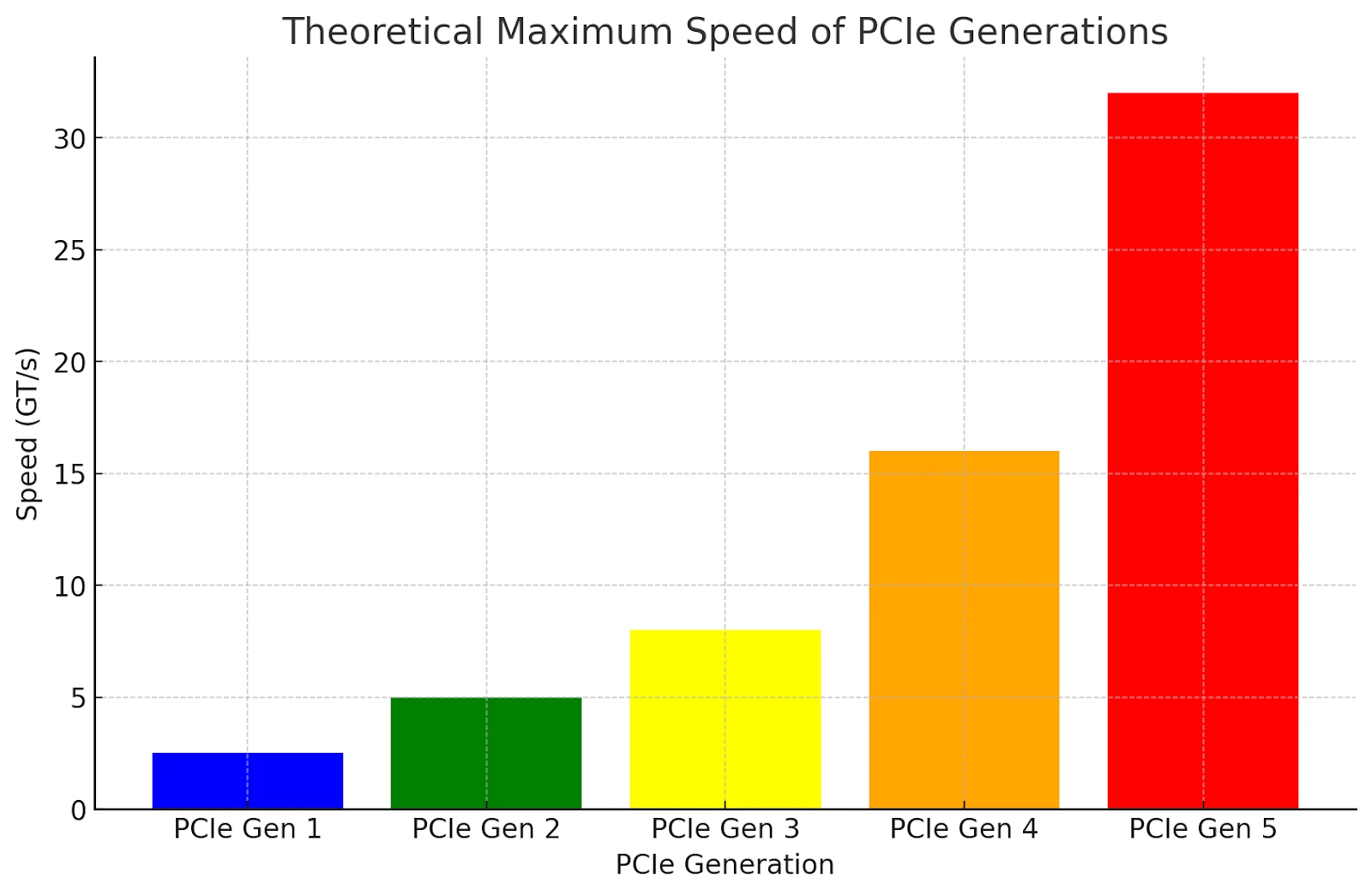
As we have seen in the past, each generation of PCIe is twice as fast as its predecessor and also backwards compatible. This simply means the latest generation of PCIe, which is PCIe5, is compatible with PCIe4, PCIe3, and more, but the speed and performance of the device will be limited.
What Are PCIe Lanes?
Before we move forward, we need to know about PCIe lanes, and they come in two types: CPU lanes (connect directly to the CPU) and chipset lanes (connect to the CPU through the chipset). Chipset lanes have limited bandwidth, causing potential bottlenecks when multiple devices are connected. CPU lanes offer faster speeds and lower latency, especially for storage devices like NVMe SSDs.
In the past, using CPU lanes for storage meant sacrificing bandwidth for the GPU. However, with newer technologies like PCIe 4.0, this bottleneck is less of an issue, and now, with the introduction of PCIe Gen 5.0, this will not be much of an issue by a long shot.
What is PCIe 4.0?
PCIe 4.0, short for Peripheral Component Interconnect Express 4.0, is a version of the standard interface that connects high-speed components to a computer’s motherboard. Graphics cards, NVMe SSDs, network cards, and other expansion devices all communicate with the processor through PCIe lanes, and 4.0 is the fourth major generation of that standard.
Its headline feature is speed. Each PCIe 4.0 lane carries data at up to 16 GT/s (gigatransfers per second), double the rate of PCIe 3.0. A full x16 slot, the kind used by graphics cards, therefore offers around 32 GB/s of bandwidth in each direction compared with roughly 16 GB/s on the previous generation. That extra headroom benefits fast storage in particular, allowing PCIe 4.0 NVMe SSDs to reach sequential read speeds of 7,000 MB/s and beyond.
PCIe is backward and forward compatible, which makes it easy to live with in practice. A PCIe 4.0 SSD will work in a PCIe 3.0 slot, and a PCIe 3.0 card will run in a 4.0 slot; in each case the link simply operates at the speed of the slower component. So upgrading a motherboard to a 4.0-capable platform doesn’t strand your existing hardware.
The standard arrived on desktops with AMD’s Ryzen 3000 series and X570 chipset in 2019, with Intel following on its 11th-generation Core platform. Today PCIe 4.0 is the mainstream baseline across most modern systems, sitting between the older 3.0 standard and the newer, faster 5.0. For the majority of users, it strikes a sensible balance, delivering more than enough bandwidth for current graphics cards and very fast storage without the cost premium that newer standards can carry.
PCIe 5.0: Do you need it?
PCIe 5.0 is the fifth generation of the Peripheral Component Interconnect Express (PCIe) interface, which was officially released in May 2019. It offers a maximum bandwidth of 32 GT/s, which in the real world translates to 64 gigabytes per second (GB/s) or 128 GB/s with PAM-4 encoding.
Compared to that, an x16-sized slot running at Gen 3 caps at around 16 gigabytes per second. Gen 4 gets 31.5 gigabytes per second. One fun fact about the new PCIe standard is that it achieves this extremely high speed of 32 GHz, which is six times faster than the CPUs that manage the data.
PCIe 4.0 vs 5.0
PCIe 5.0 doubles the bandwidth of 4.0, jumping from around 32 GB/s to roughly 64 GB/s on a full x16 slot. In practice, though, the gap rarely shows in gaming: today’s graphics cards don’t come close to saturating 4.0, so 5.0 delivers no real frame-rate gain. Where it does help is fast storage, with PCIe 5.0 NVMe SSDs reaching sequential speeds well beyond their 4.0 counterparts. For most users, 4.0 remains the sensible mainstream choice, while 5.0 is best reserved for cutting-edge SSDs and future hardware.
| Feature | PCIe 4.0 | PCIe 5.0 |
|---|---|---|
| Per-lane speed | 16 GT/s | 32 GT/s |
| Bandwidth (x16) | ~32 GB/s | ~64 GB/s |
| Gaming benefit | Full performance | No measurable gain |
| SSD speeds | Up to ~7,000 MB/s | Up to ~14,000 MB/s |
| Availability | Mainstream since 2019 | Newer, higher-end platforms |
| Best for | Most gamers and users | Cutting-edge SSDs, future GPUs |
PCIe 4.0 vs. 5.0 With Gaming
For the majority of gamers today, PCIe 4.0 is more than sufficient, and upgrading to PCIe 5.0 specifically for gaming might not yield significant benefits immediately. The choice between PCIe 4.0 and 5.0 should be guided by considerations such as future-proofing, budget, and whether other components in the system (like ultra-fast SSDs or upcoming GPUs) can utilise the extra bandwidth provided by PCIe 5.0.
If you are building a new high-end system and want to maximise its lifespan and potential, opting for PCIe 5.0 could be a wise decision. However, for most current gaming needs, PCIe 4.0 remains very capable.
Which of PCIe 4.0 and 5.0 should you choose?
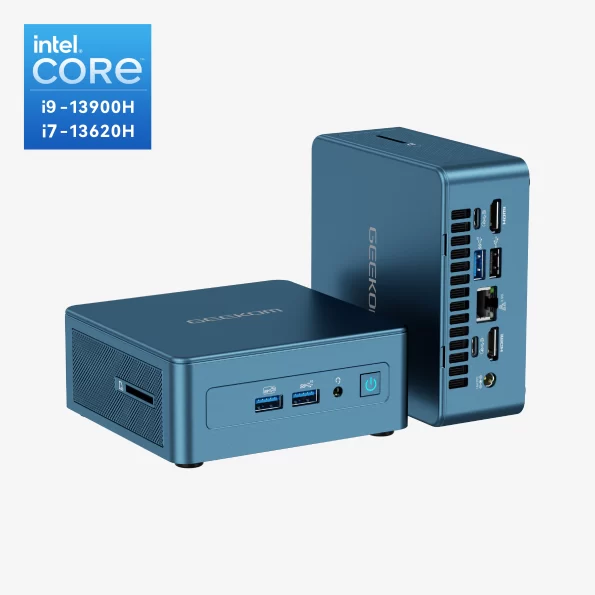
GEEKOM Mini IT13
Speaking of PCIe Gen 4.0, GEEKOM features a ton of AMD and Intel-based Mini PCs that support PCIe Gen 4.0 SSDs. Most significant is the GEEKOM Mini IT13 mini PC, a powerful mini PC powered by the latest 13th Gen Intel Core processors (i5, i7, or i9) and featuring Intel Iris Xe graphics.
The Mini IT13 has a comprehensive port selection, including two USB4 ports, and supports up to four displays with 8K resolution. It also features Intel Bluetooth 5.2 and Wi-Fi 6E for fast and reliable wireless connectivity. Additionally, there is a £10 discount available. You can also get this with 12th Gen and 11th Gen Intel Core processors, depending on your needs and budget.
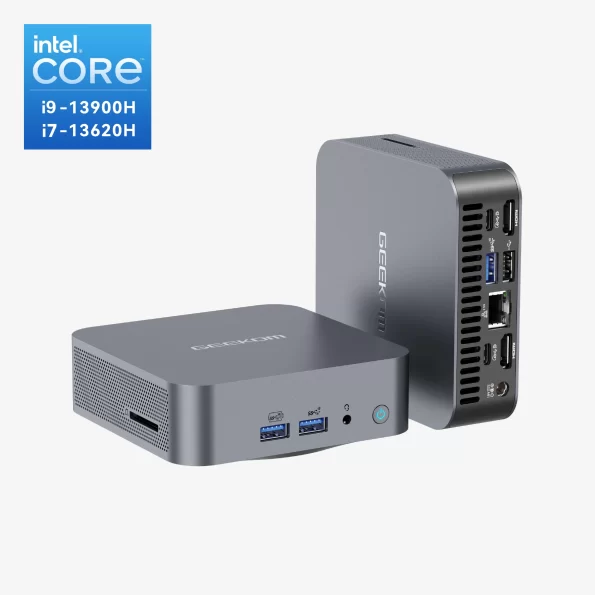
GEEKOM GT13 Pro
There is also the GEEKOM GT13 Pro, a compact mini PC with 13th Gen Intel Core i9 or i7 processors, Intel Iris Xe or UHD graphics, up to 64GB of DDR4 RAM, and up to 2TB of SSD storage. It supports 8K video, quad displays, Wi-Fi 6E, Bluetooth 5.2, and boasts a variety of ports, including USB4 and HDMI 2.0. It has an innovative IceBlast 1.5 cooling system and comes with a gift worth £39.99 if purchased within the sale period.
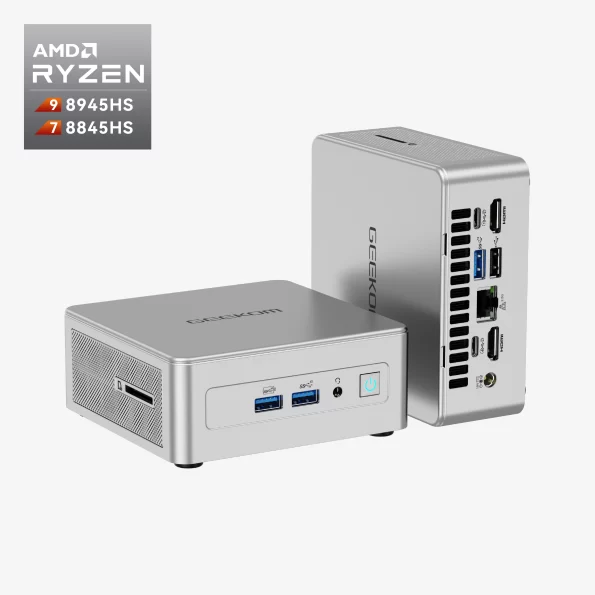
GEEKOM AE8
If you are looking for a mini PC with AMD processors, then you can check out the GEEKOM AE8 Mini PC, which is a powerful and compact computer featuring AMD Ryzen 9 8945HS or Ryzen 7 8845HS processors, AMD Radeon 780M graphics, and up to 64GB of DDR5 RAM. It also has a fast M.2 2280 PCIe Gen 4 x 4 SSD with up to 2TB of storage.
The AE8 comes pre-installed with Windows 11 Pro and includes various ports, such as USB 4.0 Type-C, HDMI 2.0, and Ethernet. It also supports Wi-Fi 6E and Bluetooth 5.2 for wireless connectivity. As a special offer, buyers can also get an extra gift worth £39.99.
GEEKOM offers a wide range of high-performance mini PCs to meet everyday needs, including the new AE8 with AMD Ryzen processors, the Geekom A7, and the Geekom AS6. Explore our full lineup to find the perfect mini PC for you. And at the time of writing, there is a sale going on where you can get up to 50% off on your purchase, so hurry up!
RTX 4090 PCie 4.0 vs. 5.0
The RTX 4090 is built on Nvidia’s Ada Lovelace architecture and connects through a PCIe 4.0 x16 interface. It does not support PCIe 5.0, so the question isn’t really which is faster for the card, but whether a PCIe 5.0 slot offers any advantage over a 4.0 one. In short, it doesn’t.
PCIe 5.0 doubles the theoretical bandwidth of 4.0, jumping from around 32 GB/s to roughly 64 GB/s across sixteen lanes. That sounds significant, but the RTX 4090 was never designed to draw on it. Even on a PCIe 4.0 x16 slot, the card rarely comes close to saturating the available bandwidth during gaming. Dropping all the way down to PCIe 3.0 x16 typically costs only a few per cent in frame rates, which tells you how much headroom already exists at 4.0.
When you install an RTX 4090 in a motherboard with a PCIe 5.0 slot, the link simply negotiates down to PCIe 4.0 speeds, the fastest the card can manage. You lose nothing, but you gain nothing either. The extra 5.0 bandwidth sits unused as far as the graphics card is concerned.
Where PCIe 5.0 can matter is elsewhere in the system, such as a PCIe 5.0 NVMe SSD, which can improve large file transfers and, with DirectStorage, marginally quicken game loading. But that’s a storage benefit, not a graphics one, and it applies whether your GPU is on a 4.0 or 5.0 link.
The practical takeaway: don’t buy a motherboard purely for PCIe 5.0 GPU support on account of the RTX 4090. Pair it with a solid PCIe 4.0 x16 slot and the card will run at full speed. Reserve any PCIe 5.0 consideration for future GPUs or fast storage.
Conclusion
Both the PCIe 5.0 and 4.0 platforms offer great flexibility and more than adequate peripheral choices for your build, but with PCIe 5, you can rest assured that advanced SSDs and GPUs released in the next few years will be fully compatible with your system. Additionally, a 20-lane CPU will provide direct connections to the GPU and SSD, potentially reducing latency.
FAQ about PCIe 4.0 vs. 5.0
Can I use PCIe 4.0 in a 5.0 slot?
Yes, you can use a PCIe 4.0 device in a PCIe 5.0 slot.
Can I put a PCIe 4.0 in a 3.0 slot?
Yes, you can put a PCIe 4.0 device in a PCIe 3.0 slot.
Does PCIe 5.0 affect gaming?
Not much, at present. Modern graphics cards don’t come close to saturating PCIe 4.0 bandwidth, so moving to 5.0 brings little to no gain in frame rates. A PCIe 5.0 SSD can slightly speed up game loading, but the difference is rarely noticeable during actual play.
Do you need PCIe 5.0 for 4090?
No. The RTX 4090 uses a PCIe 4.0 interface, so it can’t take advantage of 5.0 bandwidth anyway. Even on a PCIe 4.0 slot, it runs at full speed, and dropping to 3.0 costs only a few per cent. PCIe 5.0 brings no benefit here.